
The fastest way to make a portfolio with AI is to let an AI portfolio maker turn a short description and your best work into a polished site, no design skills or code required. That speed matters more than it sounds, because most visitors decide within seconds whether your work is worth their attention. A portfolio that loads clean, leads with your strongest piece and is easy to share does the hard part for you.
Base44's AI website builder lets you generate a real, working site from a single description, so you spend your time choosing what to show rather than wrestling with layouts. If you want the wider context on building sites this way first, see how to create a website with AI.
This guide walks through six steps that work for any type of portfolio, from design to development.
Build your portfolio with Base44
TL;DR: how to make a portfolio with AI
Making a portfolio with AI comes down to deciding what to show, generating the site from a description, then adding your work and publishing. If you're curious about timelines, how long does it take to build a website with AI sets realistic expectations.
How to make a portfolio with AI in 6 steps
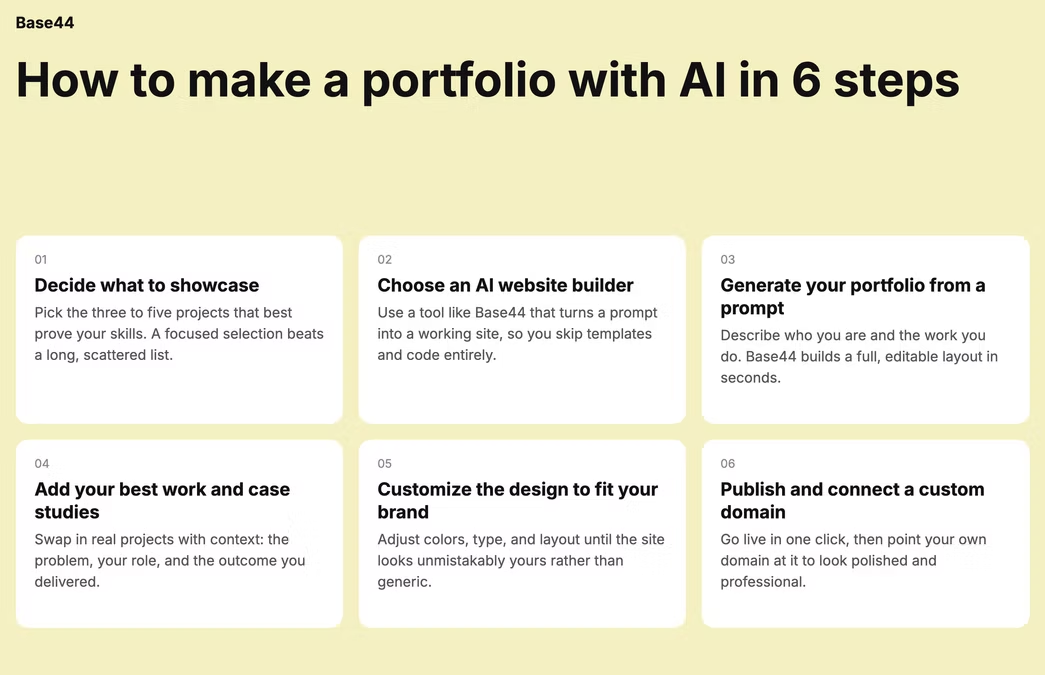
A great portfolio is less about the tool and more about the choices you make before you build. These six steps cover both: what to decide up front and how to turn it into a live site with AI.
- Decide what to showcase
- Choose an AI website builder
- Generate your portfolio from a prompt
- Add your best work and case studies
- Customize the design to fit your brand
- Publish and connect a custom domain
01. Decide what to showcase
Before you build anything, decide what story you want your portfolio to tell and who it is for. A portfolio aimed at hiring managers looks different from one aimed at freelance clients, so picture the visitor before you pick your work.
Choose your strongest pieces rather than everything you have ever made; three to six standout pieces leave a better impression than fifteen average ones. For each one, know the point it proves about you. This is the part an AI website builder can't do for you and it's what separates a memorable portfolio from a generic one.
02. Choose an AI website builder
Pick an AI website builder, like Base44, that generates a real, publishable site rather than just a static mockup you cannot ship. Look for plain-language editing, responsive layouts and a straightforward path to publishing with your own domain. Base44's AI website builder generates a working site you can edit by describing changes, so you're never stuck hand-adjusting a template.
For a wider comparison, see this guide to some of the best AI website builders.
Learn more about how to build a one-page website.
03. Generate your portfolio from a prompt
Describe what you want with your prompts: your field, the sections you need, such as work, about contact and the look you're going for. Your AI website builder should create a first version with structure and layout in place, which is far easier to react to than a blank page.
The more specific your description, the closer the first draft lands. For patterns that work, explore these best AI prompts for building a website.
Learn more about how to make a resume website.
04. Add your best work and case studies
Now fill your newly created portfolio with real work. Upload your projects and images and for the strongest ones, add a short case study: the problem, what you did and the result. A portfolio is a storytelling tool, not just a gallery, so a few sentences of context on each piece help visitors understand how you think, not just what you made.
For each project, a useful structure is three short paragraphs: what the brief or problem was, what you specifically did to solve it (not the team, you), and what the result was. If you have numbers such as improved conversion by 20%, reduced load time by half, or delivered in three weeks under budget, use them. Concrete outcomes make your work credible in a way that adjectives never do.
Keep each case study short. Two to three sentences per section is enough. The goal is not to explain everything; it is to give visitors enough context to understand your thinking and want to ask you more.
05. Customize the design to fit your brand
Adjust the fonts, colors and layout so the site feels like you, all by describing the changes in plain language. Keep it clean and let the work be the focus because a busy design competes with the very thing you are trying to show. Add video or motion only where it genuinely helps a piece land.
06. Publish and connect a custom domain
Before you go live, preview the site on both desktop and mobile, since most people will see it on a phone. Check that images load cleanly, text is readable, and the navigation works on a small screen. When it looks right, publish it and connect a custom domain so the address reflects your name or brand.
Learn more about why vibe code a website.
Getting found: SEO basics for a portfolio
A polished portfolio that nobody finds is a missed opportunity. Once you're live, a few basics make a real difference. Your name is your most important keyword, so it should appear in your page title, your H1 heading, and naturally throughout your about section. Each project page should have a descriptive title that names what you made and for whom, rather than a generic title like Project 3. Ask Base44 to review and improve your meta descriptions for each page from the chat.
If you're job-searching or freelancing in a niche, adding a few sentences to your about page that name your speciality, such as UX designer focused on fintech apps or motion designer for consumer brands, helps search engines understand who you serve. A blog is optional but valuable: even two or three posts on topics your ideal client searches for can start sending organic traffic within a few months.
Portfolio examples you can build with AI
A designer or photographer portfolio
A visual-first layout that puts your images front and center, with a clean grid and generous spacing. Describe the mood you want and let the AI portfolio builder create a gallery, then swap in your strongest shots.
A developer or AI-project portfolio
Show the projects you have shipped, what problem each one solved and the tools behind it. Link to live demos or repositories so visitors can see how you build, not just that you build. A short note on your role and the outcome turns each entry into evidence rather than a list.
A writer or content portfolio
Lead with a few representative pieces and a short line on the kind of writing you do. A simple, readable layout keeps the focus on the words and makes it easy to skim your range.
A freelancer services portfolio
Pair your best work with the services you offer and a clear way to get in touch. This turns a showcase into a tool that actually brings in clients.
Tips for a portfolio that stands out
A few things separate a portfolio people remember from one they scroll past. A real-time AI collaborator is available at every step to help you refine, so treat the first version as a starting point. And for the pitfalls to sidestep, see these mistakes to avoid when using an AI website builder:
- Lead with your strongest work: The first thing a visitor sees should be the piece you are most proud of, not a long introduction.
- Keep it to a few strong pieces: Quality beats quantity and tight selection reads as confidence.
- Tell the story behind each project: A sentence or two on the problem and the result shows how you think.
- Prioritize clean UX: Smooth scrolling, natural motion and a layout that stays out of the way let your work shine.
- End with a clear call to action: Tell visitors exactly what to do next, whether that is to hire you, view more, or get in touch.
One thing that separates active portfolio owners from people with a stale site: treat it like a living document. Every time you finish a strong project, add it while the details are fresh. Remove work that no longer represents where you are. Update your about section once a year or whenever your focus shifts. Because Base44 lets you make changes through the chat, updating a project or swapping a headline takes minutes rather than a morning of wrestling with a CMS.
How to build a portfolio with AI for free
Can you build a portfolio with AI for free?
Often, yes, many AI website builders have a free tier that lets you build and preview a portfolio, with a custom domain or advanced features available on paid plans. For a breakdown, see cost to build a website with AI.
How many projects should a portfolio include?
Usually three to six strong pieces. A focused selection of your best work makes a stronger impression than a long list, and it keeps visitors on the pieces you most want them to see.
Do you need coding skills to make a portfolio website?
No, an AI website builder generates and edits the site from plain-language descriptions, so you can build and publish without writing code. See how to build a no-code website for more.
How long does it take to make a portfolio with AI?
A first version can be ready in under an hour. The site itself generates quickly; the time you spend is mostly on choosing your work and writing short, sharp context for each piece.
Related reading: how to make a fashion website, useful if your portfolio needs to double as a storefront for products.
Related reading: how to make a website as an artist, a deeper look at gallery curation and artist statements specifically.