Learning how to vibe code a website allows you to build fully functional websites simply by describing your ideas and design preferences in plain language and without coding.
Vibe coding Vibe coding is the act of building software (an app or website) by describing the atmosphere, functionality and intent of your website (or app) to an AI tool, rather than writing the code yourself. By using an AI website builder like Base44 you can quickly and easily build a website with AI. Base44 lets users build real apps by describing what they want rather than writing syntax or learning frameworks. Base44 generates a complete, hosted, full-stack website from a single conversational prompt, handling backend, database, authentication and frontend simultaneously.
Vibe coding democratizes website creation, so that anyone can launch professional, high-quality no code websites without facing the technical barriers that often get in the way. Base44's vibe coding approach means anyone can build a production-ready app through conversation alone regardless of coding experience.
Learn more: What is Base44?
TL;DR: How to vibe code a website
Here’s what you’ll find in this guide.
| How to vibe code a website | Outcome |
|---|---|
| Define the intent of your website and its aesthetic | Establish the visual style and core purpose. |
| Select an AI website builder | Choose a natural language app builder like base44/website |
| Prompt the AI | Input your description to generate the initial build. |
| Iterate and refine your website design | Tweak the design by chatting with the AI. |
| Publish your site | Go live with a fully hosted application instantly. |
Learn more about how to get started with vibe coding.
Who should vibe code a website?
Vibe coding a website isn't just for people who want to avoid learning code. It's genuinely faster for almost everyone.
Entrepreneurs and small business owners can launch a site without a dev budget or waiting on a developer.
Designers who want to see their ideas come to life without back-and-forth handoffs can build and iterate directly.
Freelancers can deliver fully functional client sites faster, keeping more of their margin.
And creators building portfolios, communities or content platforms can focus on what they want to say, not how to build the thing that says it.
Our market is massive. It has the potential to replace entire software categories by enabling people to create software instead of buying it.
— Maor Shlomo, CEO of Base44
Learn more about getting started with vibe coding for free.
How to vibe code a website in 5 steps
Creating a website used to require months of learning coding languages like HTML, CSS and JavaScript but now the process is as simple as articulating your vision via a chat interface with an AI website builder.
1. Define your aesthetic and intent of your website
2. Choose an AI website builder
3. Input your vibe prompts
4. Start your conversational iteration
5. Launch and host your vibe coded website
01. Define the aesthetic and intent of your website
Before starting to vibe code your website you need to first decide what you want to build. Vibe coding relies heavily on your ability to describe the feeling and the function of the site you want to build.
Ask yourself:
- Is it a retro-futuristic portfolio with neon accents?
- Or a clean, corporate website?
Draft a short paragraph that sums up your website's goal. For example:
Build a modern, minimalist e-commerce storefront for a high-end clothing brand. Use a clean aesthetic with plenty of white space, a serif font for headings and a sans-serif for body text.
Key features needed for the website:
- A hero section with a bold call-to-action button.
- A product grid that displays high-quality images, prices, and 'Quick Add' buttons.
- Product pages that allow users to select Size (S, M, L, XL) and Color.
- A slide-out shopping cart sidebar to manage items.
- A responsive design that looks premium on mobile.
A common mistake first-time creators make with AI web design is withholding the insider info only they know: the little details that set them apart, what's unique about their offering, their specific services, their key benefits.
— Oz Golan, Product Group Lead, AI Creation at Wix
Write it out as a short paragraph before you open Base44. Something like: "Build a modern, minimalist portfolio for a freelance UX designer. Clean layout, plenty of white space, dark typography on a light background. Three pages: home with a hero and project grid, a case studies page, and a contact form." Keep this brief open in a separate tab while you build. Every time you send a follow-up prompt, check it against this reference first. Scope creep, where the build slowly drifts from your original idea, is the most common reason vibe-coded projects stall.
02. Choose an AI website builder
Base44 is built for exactly this. It's an AI-powered website and app builder designed to interpret conversational inputs and translate them into full-stack applications and websites.
Learn more about the cost of building a website with AI.
Unlike traditional website builders that use drag and drop editors, Base44 understands context. It handles the backend logic, database connections and frontend styling simultaneously based on your description. This allows you to focus on the creative flow without stopping to configure API endpoints or server settings. It also reduces how long it takes to build a website with AI.
Learn more about how to use Base44.
What AI tools can you use to vibe code a website?
Several AI tools support vibe coding a website, and the right pick depends on what you're building. Base44 is one of the strongest options for full-stack websites and apps. It handles backend logic, authentication, and database setup automatically from a single natural language prompt, making it well-suited for anything beyond a simple static page.
What sets Base44 apart is that it generates a complete, hosted, full-stack website in seconds, not just the front end.
03. Input your vibe prompt
Start by describing your website in your builder. This is your first prompt.
Be specific about the functionality, for example: I need an artist portfolio and the aesthetic, make it look like a 90s style site.
It automatically sets up authentication, database schemas, navigation, user permissions, and hosting. You don't need to configure anything yourself. Within seconds, you'll see a functional version of your website that reflects the prompt you entered.
With prompt engineering you can get better at describing the site you want, get better at writing prompts with AI and build a better website.
04. Start your conversational iteration
It's common for your first prompt to vibe code a website that isn't 100% perfect, it's just part of the process.
Let's say your buttons are too small, try typing, 'make the buttons larger and rounder.' Color scheme feels too cold? Prompt, 'warm up the colors with sunset tones.'
This is what turns website development into a creative conversation. You don't need to hunt through CSS files to change a font, or even drag and drop it, you simply ask for it. This rapid feedback loop allows you to polish the user interface and website experience in minutes rather than days or weeks.
Learn more about some of the
Know where vibe coding hits its limit
Vibe coding is fast at getting you most of the way there. Expect it to nail the overall structure and general aesthetic quickly, often within your first few prompts. The last stretch, the exact shade of a brand color, the precise spacing between elements, a headline that sounds exactly like you, usually takes more back-and-forth than the first 80% combined.
That's normal, not a sign you picked the wrong tool. Budget extra time for this final polish phase, and don't be afraid to make small, specific requests rather than one big one when you're this close to done.
Common mistakes when vibe coding a website (and how to avoid them)
Vibe coding is fast, but a few pitfalls catch people off guard. The most common one is starting with a vague prompt. If you write 'make me a nice website,' you'll get something generic.
The more specific you are about function, audience and aesthetic in your first prompt, the less iteration you'll need. Another common mistake is over-prompting: asking for too many changes in one message. It's better to break changes into small, focused requests ('make the hero section taller' rather than 'redesign the whole homepage').
Finally, don't skip testing before publishing. Base44 lets you interact with your app in preview mode and even test it as different user roles. Use this before you share a link publicly.
05. Launch and host your vibe coded website
Once the website matches your vision, it's time to go live. With traditional coding, this involves setting up servers, SSL certificates and domains. In a vibe coding era, this is all automated.
With Base44, deployment is instant. The platform includes built-in hosting. Just click Publish in the top bar, and your website is live. You can share your link immediately and push future updates the same way.
You can also export your code and host it elsewhere if you prefer. Base44's GitHub sync lets you push the full source to your own repository at any time, so nothing is locked to the platform. This is particularly useful if you plan to hand the project to a developer later, or if you want to self-host on Vercel, Netlify, or your own server. The export includes all frontend and backend code.
Connecting a custom domain to your vibe coded website
Once your site is live, you'll probably want a custom domain rather than a Base44 subdomain. From your app's dashboard, click Publish, then Connect a custom domain or Get Domain if you don't have one yet. Base44 also includes a free domain for one year on the Builder plan and above, as long as you're on yearly billing, so you don't need to buy one separately to get started. If you already own a domain, you can connect it by pointing your DNS settings to Base44. The dashboard walks you through the steps.
Quick SEO checklist before you go live
Before you share the link publicly, spend five minutes on the basics that help search engines find your site. Ask Base44 to review and improve your page titles and meta descriptions for each page — the AI can do this from the chat. Make sure your site loads correctly on mobile (Base44 handles responsiveness automatically, but a quick check never hurts). Add a brief, descriptive text to any key images using the alt text field. And once you're live, connect Google Analytics or a simple analytics tool from your integrations panel so you can see where your first visitors come from.
Vibe coded website examples
Portfolio website vibe coded with Base44
Thus sleek, modern one-page portfolio website showcases Prince's web development and design skills with a glassmorphism aesthetic and interactive elements.

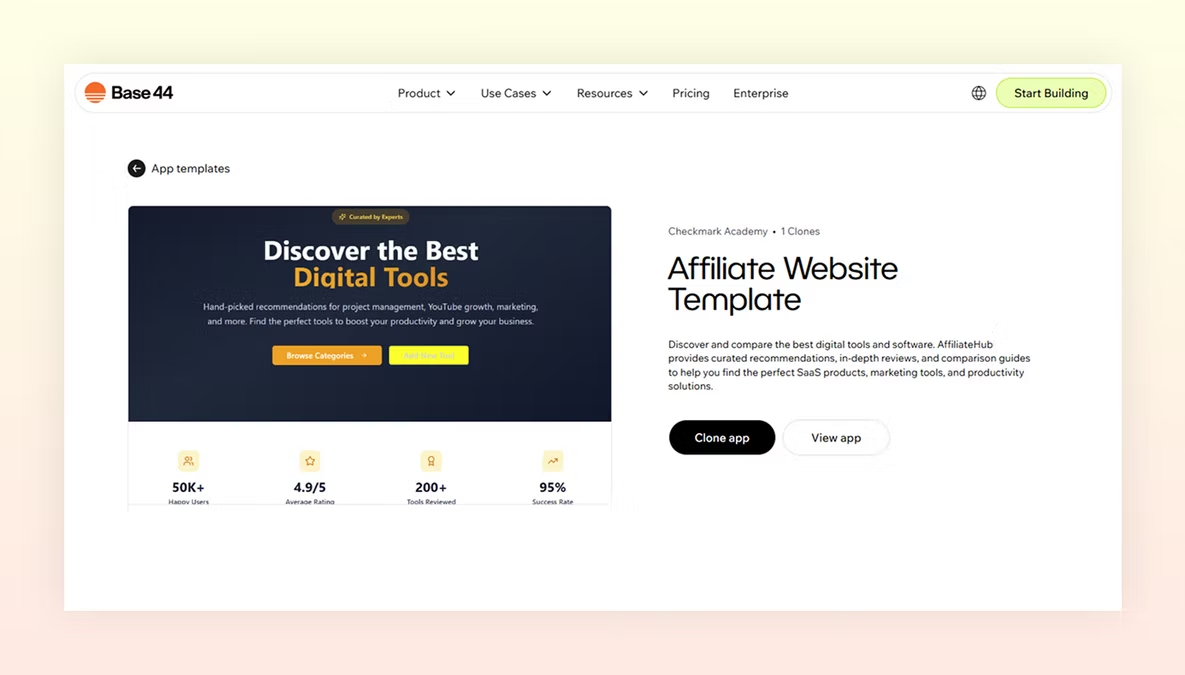
Affiliate website vibe coded with Base44
AffiliateHub provides curated recommendations, in-depth reviews, and comparison guides to help you find the perfect SaaS products, marketing tools, and productivity solutions.
Construction business website vibe coded with Base44
The official website for JCL Pro Services, showcasing their construction and maintenance solutions with a modern, professional design.

Personal website vibe coded with Base44
Elevating your online presence with bespoke, high-performance web solutions with this website.
Learn How to build a portfolio website of your own with AI

How to vibe code a website FAQ
What does vibe coding actually mean?
Vibe coding is a new term for using Generative AI to write code based on natural language descriptions of the desired vibe or outcome. Instead of worrying about syntax and logic, you can focus on the creative direction, high-level architecture and user experience, while letting the AI handle the technical implementation. Learn more about, why vibe code a website.
Do I need to know how to code to vibe code a website?
You don't need to know languages like Python, JavaScript or HTML. App builders like Base44 act as an interpreter, converting your English instructions into the necessary code structure, database queries and frontend designs automatically.
Can I change my website design after its vibe coded?
Yes because vibe coding is highly iterative. If the initial result isn't exactly what you envisioned, you simply refine your prompt. You can tell the AI to 'make it more professional, 'change the layout to a grid,' or 'add a contact form' and the system updates the application in real-time.
What is the vibe loop when vibe coding a website?
Vibe coding isn't a one-and-done process, rather its an iterative cycle. This means it follows something similar to this flow:
- Prompt: "Build a landing page for a coffee roastery with a rustic, warm vibe."
- Generate: The AI website builder builds the UI, images and text.
- Review: You notice the buttons are too small or the colors are too dark.
- Refine: You tell the AI website builder, *"*The 'Buy Now' buttons should be bigger and a deep burnt orange. Change nothing else." And it changes it. You can then repeat this for every part of your website until it looks and behaves how you want it to.
How to prevent AI hallucinations when vibe coding a website?
If your AI website builder gets stuck in a hallucination loop, essentially making the same error repeatedly follow these tips to stop it and aboid it:
- Use screenshots: Upload a screenshot of a site you love and say, "Copy this navigation style but use my branding."
- The save point strategy: Every time the AI website builder gets a section right, save your website progress. If the next prompt ruins the layout, just roll back to your last good vibe instead of trying to fix the mess.
- Be specific especially with spatial things: Instead of saying vague like, make it better, say "Add 40% of padding between the header and the hero image."
Related reading: how to make a music website, a worked example for artists and bands describing their site into existence.