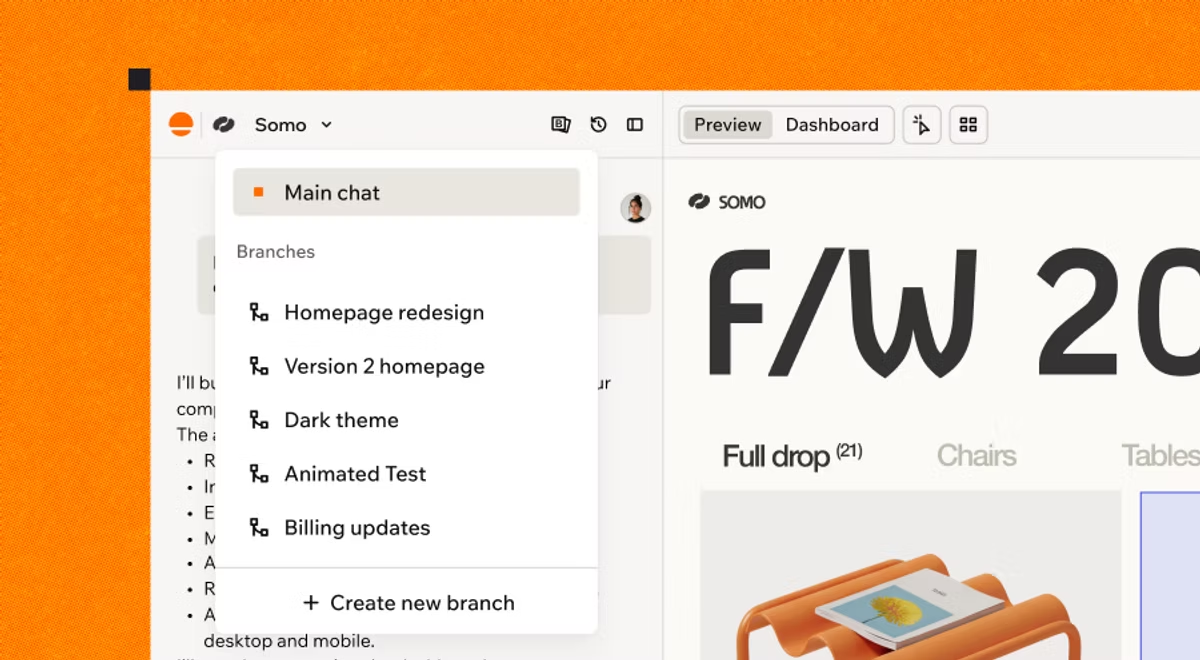
With Branches, you can now build and experiment safely on a separate version of your app or website - bold redesigns, complex features, parallel work across your team - while the main version stays untouched until you are ready to merge.
We spend a lot of time talking to Base44 builders, and one need kept coming up. Builders described it in their own words, but underneath, we kept hearing the same thing:
"I am in the middle of building a big feature and I need to fix something small in my live app."
"My team and wants to work on a couple of features at the same time."
"I have a big idea but I do not want to risk what already works."
Same need, different words. So we built Branches, a native part of the AI app builder that lets you build and experiment safely, while your main version stays intact. Merge it in when you are happy with it or leave it behind if you are not.
What are Branches
Think of your app as a path moving forward. A branch is where you step off that path in a new direction, try something out, and decide later whether it becomes part of the main road.
When you create a branch, Base44 starts a fresh line of work from where main is right now. You build on that branch the same way you always build, by describing what you want in the chat. The difference is that nothing you do on a branch changes your app's main version until you choose to merge.

How Branches work
Every branch runs as its own space, so your main app stays exactly as it is while you experiment.
Each branch has its own chat and live preview, and because each builds independently, work on one keeps moving while you build on another.
A few things are shared across all branches: your data, connections, automations, workflows, in-app agents, and app settings. This means any records you add, change, or delete while previewing a branch affect your real data everywhere. When you want to experiment safely, switch your preview to test data. It is available on the Builder plan and higher, and it is set per branch.
When you are ready, Merge to main brings your branch into your app. Your changes reach users only when you publish from main, so you stay in control of exactly what goes out and when.
Built for solo builders and teams alike
If you are building solo, branches turn your app into a playground. You can treat any idea as low stakes, because nothing you try touches your live app until you say so.
If you are building with a team or with enterprise-grade needs, branches give you something close to staging environments without any of the setup. Collaborators can each open a different branch and build at the same time.
This allows you to develop major work in isolation while your live app keeps serving real users. And because merging always flows through main, and publishing always happens from main, you keep one clear, governed path to production no matter how many ideas are in flight.
Watch Sam Teasdale demo Branches live to the Base44 community:
Watch: Base44 Office Hours - Branches
The use cases: what builders are actually doing with branches
-
Try a bold redesign without pausing everything
Say you want to try out a completely different look for your app- a new brand, new fonts, a fresh vibe. In the past that meant stopping everything else while you reworked the whole thing. With a branch, you can spin up a full redesign on the side, watch it build in its own preview, and compare it against your current version. If it is better, you merge it. If it is not quite right, you leave it behind and lose nothing. Your live app never skipped a beat.
-
Give your team parallel tracks and say goodbye to bottlenecks
Branches run in parallel, and that is a genuine shift in how much your team can move at one time. You might have one person redesigning the homepage, another building a new backend dashboard, and a third working on a seasonal theme, all at the same time. Your app runs up to five builds at once, so every team member can chase their own idea on their own branch, without ever waiting on someone else.
-
Build a feature now, launch it later
Some features are ready before the world is. Maybe you are building a seasonal look for a holiday that is two months away, or a new section you want to hold until launch day. Keep it on a branch, keep polishing it whenever you have time, and merge it exactly when the moment is right. Work you did weeks ago drops into production the day you decide it should.
-
Explore a new idea in its own space, and drop it if it does not
Every builder has gone down a path they were not sure about. One of our own team members once spent about a hundred prompts building a raffle system for an app, complete with animations and automated emails, only to decide it did not fit and bin the whole thing. That used to be a revert. Now it is a branch. You get to chase the cheesy, ambitious, not-sure-if-it-works idea in its own space, and if it does not land, you simply walk away. The freedom to explore is the whole point.
-
Fix a live bug without losing your in-progress work
Here is a situation every builder knows. You are deep into a big piece of work, and a user reports a critical bug that needs fixing now. You do not have to choose between the two. Your big work waits safely on its branch while you jump to main, fix the bug, and publish. Then you bring main's latest changes back into your branch with one click and pick up right where you left off. No lost progress. No hard decisions.
A few things worth knowing
Branches are for changes to your app's design, pages, and front-end behavior. A handful of actions still happen on main, including publishing, editing your data structure, and changing secrets, connectors, automations, workflows, and in-app agents. If you ask for one of those on a branch, Base44 will simply point you to main.
Building on a branch uses credits the same way building on main does, from the same balance, so there is no extra cost to experimenting. There is no limit on how many branches you can keep open at once. And if your app is connected to GitHub, you will manage versions through GitHub instead, so branches and a connected repository are not used at the same time.
You can read the full details anytime in the Branches documentation.
Go build. You will not break anything.
To create your first branch, open your app in the editor, click your app's name at the top of the chat panel, and choose Create new branch. Describe what you want to build, and Base44 takes it from there.
You could always revert. Now you can explore.
Ready to start building? Head to Base44 and turn your next idea into a working app.