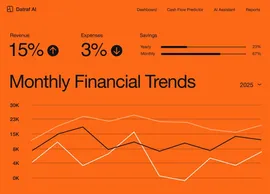
Build your own marketing analytics app
Create a fully functional marketing analytics app in minutes. Turn your requirements into working software without writing a single line of code.


From concept to creation with Base44
Build custom marketing analytics apps with AI that fit your exact workflow. Get a tailored solution without the heavy lifting.
Build with a simple prompt
Bring your ideas to life using natural language. Simply describe the workflow you need, and get a ready-to-use solution instantly.
Brainstorm while you build
Collaborate with Base44 AI to explore features and refine your app in real-time. Test ideas and evolve your product dynamically as you create it.
Publish with one click
Publishing your marketing analytics app is as simple as hitting a button. Your app is hosted and ready to share immediately, or you can connect a custom domain in seconds.
Backend power included
Your marketing analytics app comes with a robust backend built-in. With auth, user management, and storage ready from day one, you can focus entirely on your users.
Automate and scale
Enable built-in AI assistants to handle repetitive work. Connect tools, trigger actions, and automate workflows effortlessly, giving you more time to grow.
How to build your own marketing analytics app
- 01
Describe your needs
Tell Base44 what you want your app to do. For marketing analytics apps, you might describe how you'll track campaign performance, analyze customer behavior, and visualize key metrics.
- 02
Generate your app
Base44 AI builds your app from your description. You'll get a marketing analytics app that includes data tracking, reporting features, and visualizations ready for your insights.
- 03
Customize the design
Refine your app's look and features to match your vision. Adjust the layout, colors, and dashboards to align with how you want to present your marketing analytics data.
- 04
Enable AI features
Add smart assistants and automation to your app. Enable AI agents that can analyze trends, offer insights, and help you make data-driven decisions for your marketing analytics.
- 05
Launch your app
Deploy your app and share it with users. Your marketing analytics app goes live instantly, so you can start tracking performance and optimizing your strategies right away.
Seamless
integrations for your
app ecosystem
Explore how Base44 integrates effortlessly into your existing marketing workflows for enhanced connectivity

 HubSpot
Seamlessly sync contacts and workflows with HubSpot to enhance campaign targeting and effectiveness.
 Explorium
Enrich your marketing insights with B2B data from Explorium for smarter decision-making.
 BrightData
Utilize BrightData for real-time data feeds to stay ahead in market trends and consumer behavior.
 Zapier
Automate your workflow with Zapier to connect over 6,000 apps, streamlining your marketing analytics process.
Want to see a new integration?
Tell us
what to add next
Prompting your marketing analytics app
Phase 01
Project setup
Create a marketing analytics app with user authentication, campaign tracking, and performance metrics dashboard
Add a data model for storing campaign details, including start date, budget, and target audience demographics
Phase 02
Core & advanced features
Integrate Google Analytics to pull in website traffic data and visualize user engagement metrics in real-time
Add predictive analytics functionality to forecast campaign performance based on historical data trends
Phase 03
Polish & deploy
Design the user interface with interactive charts and graphs using our brand colors (#FF5733 for highlights, #F1F2F6 for backgrounds)
Set up automated email reports for weekly campaign performance summaries sent to marketing teams



Discover related use cases
Trusted by
10M+ builders

Build the marketing analytics app only you can build
Frequently asked questions
Here are 6 steps to build a marketing analytics app that shows what your campaigns actually return:
- Pick your key metrics: Choose the few numbers you review weekly, like ROI, engagement rate and cost per lead. List them in your prompt so the dashboard shows those first.
- Model your campaigns: Store start date, budget, channel and target audience for each one. Base44 creates a campaigns table from your description, and you can edit records in the app dashboard.
- Prompt the dashboard: Ask for a campaign tracker with performance charts, ROI by channel and week-over-week trends. Base44 builds the tracker, the charts and the ROI calculations from that prompt.
- Refine the charts: Ask the chat to change date ranges and filters, or to add a breakdown such as cost per lead by channel. Use Visual Edit to adjust colors, layout and text.
- Bring in your data: Connect HubSpot for contacts, Bright Data for market feeds or Zapier for the rest. Ask the chat to add each one, then check totals against a report you trust.
- Test and share: Check one campaign's numbers in preview, then ask the chat for a scheduled task that emails weekly summaries. Click Publish to get a live link, then invite your marketing team to sign in.
Your dashboards and campaign records sit in one app with a built-in database and user logins, so each teammate signs in and sees the same numbers. Start by describing your current report layout in your first prompt.