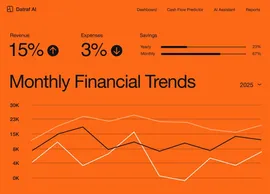
Build your own social media scheduler app
Create a fully functional social media scheduler app in minutes. Turn your requirements into working software without writing a single line of code.


From concept to creation with Base44
Build custom social media scheduler apps with AI that fit your exact workflow. Get a tailored solution without the heavy lifting.
Build with a simple prompt
Bring your ideas to life using natural language. Simply describe the workflow you need, and get a ready-to-use solution instantly.
Brainstorm while you build
Collaborate with Base44 AI to explore features and refine your app in real-time. Test ideas and evolve your product dynamically as you create it.
Publish with one click
Publishing your social media scheduler app is as simple as hitting a button. Your app is hosted and ready to share immediately, or you can connect a custom domain in seconds.
Backend power included
Your social media scheduler app comes with a robust backend built-in. With auth, user management, and storage ready from day one, you can focus entirely on your users.
Automate and scale
Enable built-in AI assistants to handle repetitive work. Connect tools, trigger actions, and automate workflows effortlessly, giving you more time to grow.
How to build your own social media scheduler app
- 01
Describe your needs
Start by sharing what you want your app to do. For a social media scheduler app, you might describe how you'll manage posts, track engagement, and schedule updates across various platforms.
- 02
Generate your app
Base44 AI takes your description and builds your app. You'll get a social media scheduler app equipped with features for scheduling posts, analytics, and user-friendly interfaces ready to go.
- 03
Customize the design
Make your app truly yours by refining its look and features. Tailor the layout, colors, and functionalities to match your style and how you plan to manage your social media presence.
- 04
Enable AI features
Add smart capabilities to your app with AI features. Enable AI agents that can suggest optimal posting times, analyze engagement metrics, and help automate your social media strategy.
- 05
Launch your app
Deploy your app to share it with your audience. Your social media scheduler app goes live instantly, empowering you to manage your social content and engage with your followers effortlessly.
Seamless
integrations for your
app ecosystem
Integrate your social media scheduler with the tools you rely on, enhancing connectivity and workflow.

 HubSpot
Syncing with HubSpot enhances marketing campaigns, streamlining social media outreach directly from your scheduler.
 Slack
SlackIntegrate with Slack to receive instant notifications and feedback, ensuring your team stays aligned on social media strategies.
 X (Twitter)
Connect with X (Twitter) to monitor trends and sentiment, enabling timely and relevant content scheduling.
 Zapier
Use Zapier to automate repetitive tasks across 6,000+ apps, making your social media scheduling seamless and efficient.
Want to see a new integration?
Tell us
what to add next
Prompting your social media scheduler app
Phase 01
Project setup
Create a social media scheduler app with user authentication, profile settings, and account linking for major platforms.
Add a calendar interface to display scheduled posts, including filters for different social media accounts.
Phase 02
Core & advanced features
Implement a feature to draft, edit, and schedule posts for Facebook, Twitter, and Instagram with image uploads.
Add analytics tracking for post engagement, including likes, shares, and comments across platforms.
Phase 03
Polish & deploy
Design the user interface with a modern look, using our brand colors (#FF5733 primary, #F0F0F0 background) and logo.
Set up automated email notifications for post reminders and engagement reports, linked to custom domain scheduler.mycompany.com.



Discover related use cases
Trusted by
10M+ builders

Build the app only you can build