
Launch your app faster with Base44. Start now →
Vibe coding with ChatGPT means describing the app you want in plain language and letting the AI write the code, instead of typing every function yourself. If you have an idea for a workout tracker, a small CRM, or an internal tool but limited coding experience, Base44's AI app builder gives you that same conversational workflow, plus the backend, hosting, and deployment pieces ChatGPT alone does not handle.
This guide breaks the process into six practical steps, from scoping your idea to shipping a working prototype. Base44 vibe coding lets users build apps by describing what they want conversationally, so once you get comfortable with what is vibe coding in general, applying the same approach with ChatGPT becomes much easier.
TL;DR: how to vibe code with ChatGPT
Vibe coding with ChatGPT comes down to six steps: define your idea, set up your workspace, write clear prompts, build in small chunks, test and debug with AI help, then polish and ship. Each step below builds on the last, and you can get started with vibe coding even if you have never written a line of code.
| Steps | What to do |
|---|---|
| Define your idea | Write down what the app does, who uses it, and its core screens. |
| Set up your workspace | Open ChatGPT next to a code editor and organize your project folder. |
| Write clear prompts | Describe features specifically instead of vaguely. |
| Build in small chunks | Ask for one feature or component at a time. |
| Test and debug | Paste errors back into ChatGPT and ask it to explain the fix. |
| Polish and ship | Refactor, document, and prepare the app to share or deploy. |
Ready to put these steps into practice? Start building with Base44 today.
Vibe coding with ChatGPT in 6 steps
Each of these steps works whether you are building your first app or your tenth. Follow them in order the first few times, then adapt the process to fit your own workflow.
- Define what you want to build
- Set up your workspace
- Write clear, specific prompts
- Build feature by feature, in small chunks
- Test, debug, and iterate
- Polish, document, and ship
01. Define what you want to build
Before you open ChatGPT, get specific about what you are building. Write down the app's purpose, who will use it, and the two or three core screens it needs. Base44's AI app builder turns vague ideas into structured working apps, and the same principle applies here: the clearer your starting scope, the less back and forth you will need later.
02. Set up your workspace
Open ChatGPT in a browser tab next to your code editor, whether that is Visual Studio Code, a lightweight text editor or Base44's own AI chat interface. Create a dedicated project folder, and if you are comfortable with it, use version control so you can track changes as ChatGPT generates and updates code.
A tidy workspace matters more than it seems like it should. When ChatGPT hands you a new file or an updated function, you need a clear place to put it and a quick way to compare it against what you had before. Naming your files consistently and keeping related components in the same folder saves you from a lot of confusion once your project grows past two or three screens.
03. Write clear, specific prompts
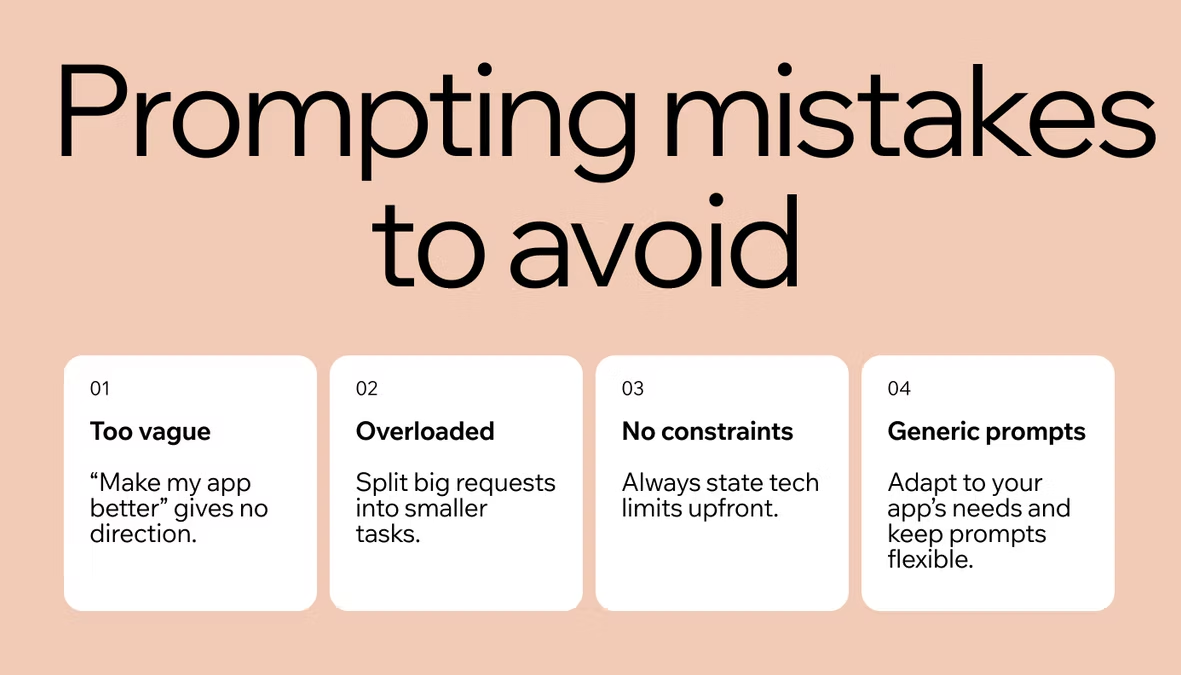
The quality of what ChatGPT gives you depends heavily on how you ask. Instead of asking it to “build me an app,” describe the exact feature, the fields it needs, and how it should behave. If you want more structure around this part of vibe coding with ChatGPT, Base44's guide on how to write AI prompts walks through phrasing techniques that consistently produce better first drafts.
04. Build feature by feature, in small chunks
Resist the urge to ask for the entire app in one prompt. Build the folder structure first, then one component or screen at a time. Smaller requests are easier for ChatGPT to get right, and easier for you to review before moving to the next piece.
A useful pattern here is to think out loud with ChatGPT before asking for code. Describe the component, ask it to confirm what it understood, then request the implementation. This extra step catches misunderstandings early, before they turn into a feature that technically works but does not do what you actually wanted.
05. Test, debug, and iterate
Run what you have built after every addition, not just at the end. When something breaks, paste the exact error message and the relevant code back into ChatGPT and ask it to explain what went wrong, not just fix it. This habit also helps you avoid common vibe coding mistakes, like accepting code you do not understand well enough to fix yourself later.
06. Polish, document, and ship
Once the core functionality works, ask ChatGPT to refactor rough sections, add comments, and generate a short README describing what the app does and how to run it. This last step turns a working prototype into something you, or anyone else, can pick up again later.
This is also the point to decide what happens next. Some prototypes are fine staying exactly as they are, built for one person and one use case. Others need real hosting, a proper database, and a way to handle more than a handful of users, which is usually where vibe coding with ChatGPT alone starts to run out of runway.
Base44 vibe coding examples
ChatGPT is a strong starting point for vibe coding, but pairing it with a platform built for the same workflow makes the step from prototype to real product much shorter. These vibe coding examples show the kinds of apps people build this way.
A personal workout tracker
A simple list of exercises, sets, and rest timers, with no account creation or ads required, built the same way you would prompt ChatGPT: describe the screens, then refine them one at a time.
A small business CRM
A lightweight CRM that tracks leads, notes, and follow-up dates. Base44's no-code app builder handles complex infrastructure so users never have to, which matters here since a CRM needs a working database from day one, not just a front end.
An internal scheduling tool
An internal tool for assigning shifts or booking shared resources, built for a team rather than the public. It does not need to look polished on day one, just functional enough for your team to start using it, and you can keep refining it as your team's needs change. For a fuller version with staff records and time off, here's how to build an employee management app.
A quiz or learning app
A short quiz app with scoring and a results screen, useful for onboarding new hires, testing students or just for fun. This kind of project is a good first vibe coding attempt because the logic is contained and easy to test.
A personal expense tracker
A simple log of expenses with a running total and a basic chart, similar in scope to the kind of side project most people start with when they first try vibe coding with ChatGPT.
Turn your idea into an app with Base44
How to vibe code with ChatGPT FAQ
Is vibe coding with ChatGPT considered cheating?
No. Vibe coding with ChatGPT is a way of prototyping, not a shortcut around understanding your own product. You are still making every decision about what the app does and how it behaves, while ChatGPT handles the syntax. Professional developers use the same AI assisted workflow to move faster on real projects.
How much code can ChatGPT actually write?
ChatGPT can generate a full working prototype, including multiple screens, basic logic, and simple data handling, in a single session. For anything you plan to launch publicly or handle real user data, plan on reviewing and testing that code rather than shipping it exactly as generated, especially around how it stores information and handles edge cases you have not thought to test yet.
Do you need coding experience to vibe code with ChatGPT?
No, but a little familiarity helps. You do not need to write code yourself, but understanding basic concepts like what a database or a button click does makes it easier to describe what you want and catch mistakes early.
What coding language is ChatGPT best at?
ChatGPT works well across most popular languages and frameworks, including JavaScript, Python, and common web frameworks. The result depends more on how clearly you describe what you want than on which language you choose.
Can ChatGPT build a full, production-ready app on its own?
It can get you most of the way for a prototype, but a production app still needs security review, proper hosting, and testing beyond what ChatGPT alone provides. That is usually the point where builders move from a ChatGPT conversation to a dedicated platform to finish the job, since a live product also needs things like user accounts, data storage, and monitoring that a chat window was never designed to manage on its own.