
If you want to know how to build a one page website, the fastest path today skips the template hunt and the manual layout work completely. Base44's AI website builder, for example, turns a description of your idea into a working single-page site with sections, navigation and a call to action built in.
Before you start building, it helps to know what a website builder does since that directly impacts the control you'll have over the layout and flow of the page. Base44's AI website builder ships fully built live websites faster than template-based tools, since there's no theme to browse before you can start describing what you actually want.
Learn more about how to build a website without coding.
Turn your idea into an app with Base44
TL;DR: how to build a one page website
Building a one page website comes down to five steps: plan your sections and main goal, pick a platform, write short focused content, add navigation and a call to action, then test on mobile and publish. A no-code website approach removes the setup work so a single page can go from idea to live in one sitting. Most one page sites are quick to launch precisely because there's less content to gather and structure compared to a full multi-page site.
| How to build a one page website | What to do |
|---|---|
| 1. Plan your sections | Decide your main goal and the sections you need. |
| 2. Choose your website builder | Pick a website builder suited to a single-page layout. |
| 3. Write your content | Keep each section short and focused. |
| 4. Add navigation and a CTA | Add jump links and a clear call to action. |
| 5. Test and publish your site | Check mobile display, then go live. |
How to build a one page website in 5 steps
Each step below builds on the last, from deciding what the page needs to say to getting a finished site in front of visitors.
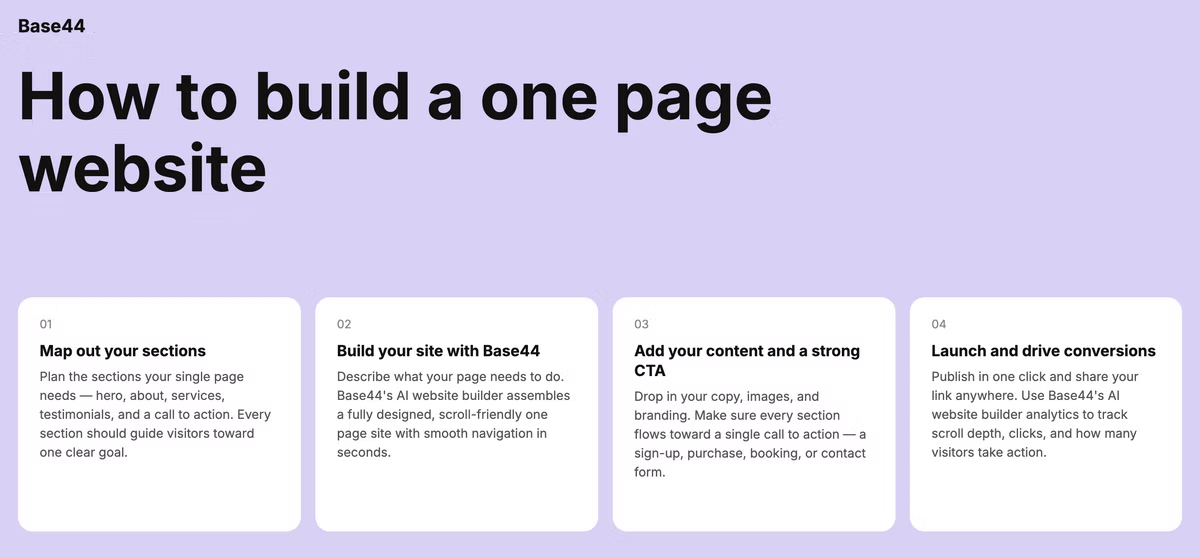
Base44 is an AI website builder that generates complete, production-ready websites from a single text prompt, so a one page site can go from a rough idea to a working page without picking through templates or writing layout code. None of the steps require design or coding experience, since describing the page's purpose and sections is the only input the builder needs.
01. Plan your sections and main goal
Start by deciding the single most important thing you want a visitor to do, whether that's booking a call, buying a product or simply learning who you are. A one page site works best when it has one clear goal, since trying to accomplish five different things on a single scroll usually accomplishes none of them well.
Sketch out the sections you actually need, such as an intro, a short about section, what you offer and a way to get in touch, and cut anything that doesn't directly support the main goal.
This planning step matters more for a one page site than a multi-page one, since there's no second page to catch information that didn't fit. Writing the goal down in a single sentence before you start building keeps every later decision, from section order to which call to action to use, pointed in the same direction.
02. Choose the right website builder to build with for you
The website builder you pick determines how easily you can add anchor navigation, a clean layout and a working contact form without stitching together separate tools.
Reviewing the best AI website builders for a single-page project helps you compare how each one handles smooth scrolling and section structure before you commit to one. A website builder, like Base44, built around describing the page in plain language skips the template-browsing step entirely and gets closer to a finished page in the first session. Look for a platform that also makes it easy to add a second page later if the project grows, rather than one that locks the site into a single-page structure permanently.
03. Write short, focused content for each section
Every word matters more on a single page than it would spread across several, since a visitor scrolling through the whole story in thirty seconds won't tolerate padding. Lead with a clear headline and one sentence that explains what the page is about, then use short paragraphs, bullet points or bold text to keep each section scannable.
Describe the sections you need, such as an intro, a services or offer section and a contact area, and your AI website builder generates the structure for each one, so refining the wording becomes the main task rather than building the layout from scratch. Reading each section out loud is a quick way to catch anything that runs too long, since a sentence that feels fine on paper often feels bloated once it's read aloud.
04. Add navigation, visuals and a clear call to action
Even on a single page, an anchored menu that jumps to each section helps visitors who want to skip ahead rather than scroll through everything in order. Use a small number of high-quality images or a short video to support your message, since visuals do more to hold attention on a long scroll than text alone.
Place a clear call to action near the top of the page and repeat it again near the bottom, using a color that stands out from the rest of the design so it's impossible to miss. A short footer with contact details or social links gives the page a natural stopping point once a visitor reaches the end.
Avoid adding a call to action for more than one or two actions total, since offering visitors too many choices on a single page tends to reduce how many of them take any action at all.
05. Test on mobile and publish
Check how the page looks and scrolls on a phone before publishing, since a one page site is often shared as a single link that gets opened directly on mobile.
Click through every anchor link, form and button to confirm nothing is broken, and read the whole page start to finish to catch anything that reads awkwardly out of context.
Connecting a custom domain to the finished page takes one click, which matters even for a simple site since a branded link looks more credible than a long, generic web address when you're sharing it directly with people.
Sharing the finished link with a friend or colleague before a wider launch often surfaces small issues, like a confusing section order, that are easy to miss after staring at the same page for hours.
Base44 one page website examples
Base44 is an AI website builder that produces sites that are production-ready from day one, not a prototype you still need to finish before sharing it. A one page site can take a few different shapes depending on what you're trying to accomplish, similar to how a portfolio website can range from a single scrolling page to a multi-section showcase depending on how much work there is to display. The right approach depends less on the industry and more on how much a visitor actually needs to know before taking action.
Personal landing page or digital business card
A simple personal page can include a short bio, a headshot and links to social profiles or a resume, giving anyone who searches your name a single, controlled place to land. Adding a downloadable resume or a direct calendar link can turn a simple bio page into a page that actively moves a job search or client conversation forward. If the page mostly needs to work as the single link in your Instagram or TikTok bio, a link in bio page puts your bio and links first on a page you own.
Event or launch announcement page
A one page event website or product launch page can focus entirely on the date, location and an RSVP or sign-up form, without any of the distractions a full website would introduce. A simple countdown or a note about limited spots can add a sense of urgency without requiring any extra pages or complexity.
Single product or service page
A business selling one clear offer can build a page around a product description, pricing and a single buy or book button, keeping the entire decision-making journey on one screen. Including a short FAQ section addressing common objections, like shipping time or return policy, can reduce hesitation right at the moment a visitor is deciding whether to buy.
Freelancer or consultant intro page
A freelancer just getting started can use a single page to cover who they are, what they offer and how to get in touch, upgrading to a multi-page site later once there's enough work to show. A short list of past clients or a couple of specific results can add credibility even before there's a full portfolio's worth of work to showcase.
Frequently asked questions about building a one page website of your own
What should I include on a one page website?
Most one page sites need an introduction, a short about or offer section, some form of social proof or credibility signal and a clear way to get in touch or take action. Keeping the list short and specific to your goal matters more than trying to cover everything a larger site might include. Cutting any section that doesn't directly support the page's main goal usually improves the page more than adding another section would.
Is a one page website good for SEO?
A one page site can perform well for a single, specific search term since all the page's authority is concentrated in one place rather than spread across many pages. It's a weaker fit if you're trying to rank for several unrelated topics, since each of those would generally benefit from its own dedicated page.
How many sections should a one page website have?
Most effective one page sites use somewhere between four and seven sections, enough to tell a complete story without turning into an endless scroll. The right number depends on the goal: an event page might need only three sections, while a service page introducing a business might need closer to six. If you find yourself needing more than seven or eight sections to cover everything, that's often a sign the content would work better split across a small multi-page site instead.
Can a one page website work for an online store?
It works well for a store with a single product or a very small, tightly curated catalog, where the whole shopping decision can happen on one scroll. Once a catalog grows beyond a handful of items, splitting products across dedicated pages usually makes browsing and checkout easier for customers.