
If you want to know how to make a community website, the fastest path today skips hosting, plugins and hired help entirely. Base44's AI website builder turns a description of your community into a working site with profiles, forums and content areas built in.
Before you start building, it helps to know what a website builder does under the hood, since that shapes how much control you'll have over your community's layout and features. Base44's AI website builder requires no designer and no developer, just a description of what you want to build.
Turn your idea into an app with Base44
TL;DR: how to make a community website
Building a community website comes down to five steps: define your audience, pick a platform, set up member features, design the site and go live. A no-code website approach removes the technical setup so you can focus on the community itself instead of stitching together hosting, plugins and themes. Most communities can go from idea to a working site in a single sitting once the purpose and features are clear.
| Step | What to do |
|---|---|
| 1. Define purpose and audience | Decide who the community serves and what they'll get from joining. |
| 2. Choose your AI website builder | Pick a builder that supports profiles, forums, and membership tiers. |
| 3. Set up member features | Add profiles, discussion areas, and content-sharing tools. |
| 4. Design and set guidelines | Build the layout and write the rules members agree to. |
| 5. Launch and grow | Promote the site, onboard early members, and keep content fresh. |
How to make a community website in 5 steps
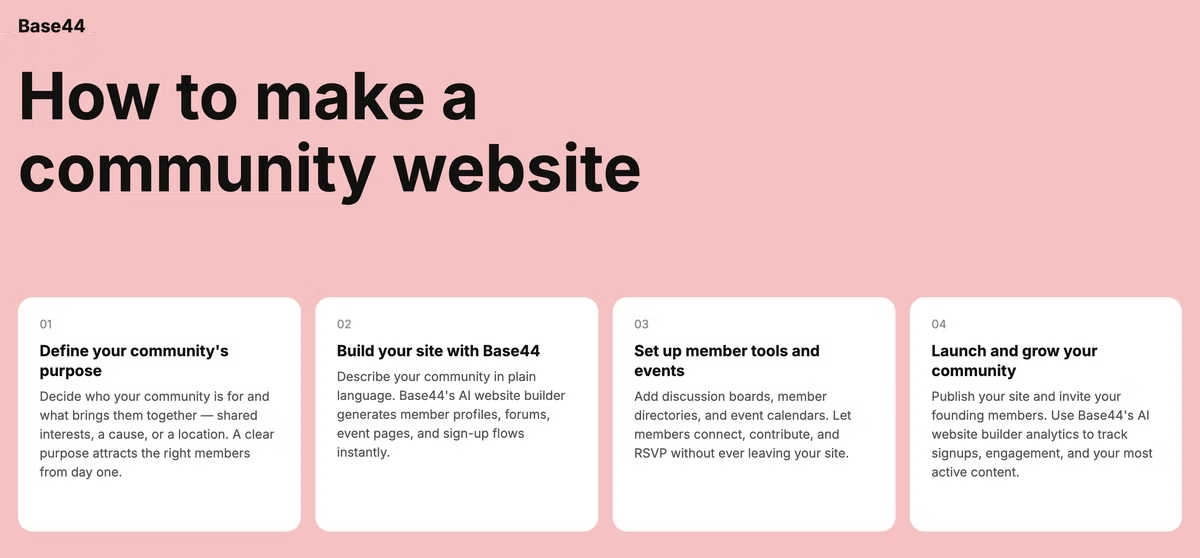
Each step below builds on the last, from defining who your community is for to getting the site in front of them.
Base44 is an AI website builder that generates a complete, production-ready site from a single text prompt, so you can move from a rough idea to a working community hub in one session instead of weeks of setup. None of the steps require technical knowledge going in, since describing what you want is the only input the builder needs.
01. Define your community's purpose and audience
Start with who the community is for and what brings them together, whether that's a shared hobby, a professional network, a local group or a customer base you want to keep engaged long after the first purchase. Write down three or four specific goals, like growing sign-ups for a monthly event, gathering feedback on a product or giving members a place to swap advice with each other. Specific goals shape every decision that follows, from the features you build to the tone of your community guidelines and the kind of content you post first. It also helps to look at where similar communities already gather, like existing forums or social groups, to understand what's missing that your site could fill.
02. Choose the right website builder to build on
The website builder you pick determines how much customization and control you have over member accounts, moderation and design. Traditional builders often mean stitching together separate plugins for forums, profiles and payments, which adds setup time before your community can even open its doors, and each new plugin is one more thing to maintain as your site grows.
Reviewing the best AI website builders for your use case helps you compare how each one handles member accounts, content structure and scalability before you commit to one. Look for a platform that can grow with your community rather than one you'll outgrow within a year, since migrating an active community to a new platform later means asking every member to re-register.
03. Set up member profiles, forums and content areas
Member profiles give people a sense of identity inside the community, while forums or discussion boards give them a reason to come back on a regular basis. Describe the features you need, such as profile pages, a discussion board, a resource library or a job listing area and your AI website builder generates the structure for each one automatically.
Keep the first version simple: a profile page, one central forum and a shared content area cover most communities at launch, and you can always describe new sections later as your members ask for them. Adding chat rooms or private messaging can come once the core forum shows steady activity, rather than launching with every feature at once.
04. Design your site and set community guidelines
Visitors decide whether to stay within seconds, so a clear layout and consistent branding matter as much as the features underneath. Intuitive navigation, mobile-friendly design and a color scheme that matches your community's identity all build trust before a visitor even reads your first post.
Alongside the design work, write down what is and isn't acceptable member behavior, how conflicts get moderated and what happens when guidelines are broken. Publish these rules somewhere members see them before they join, not after a problem comes up, so expectations are clear from day one. Revisit the guidelines every few months as the community grows, since the rules that fit ten members rarely cover everything a thousand members need.
05. Launch, promote and grow your community
Test every form, link and registration flow before you go live, then pick a launch date when your target audience is most likely to be online and paying attention. Share the link through email, social media and any existing groups where your future members already spend time, since word of mouth from a handful of engaged early members often carries a new community further than paid promotion.
After launch, keep the community active by starting discussions yourself, responding to members directly and adding fresh content on a predictable schedule so the site never feels abandoned. Treat the first few weeks as a soft launch, watching how early members actually use the site before promoting it more broadly.
Base44 community website examples
Base44's AI website builder is built for founders, creators and organizers who need a real community site shipped fast, without the overhead of a traditional build. Here are a few community website types you can describe and build the same way, whether you're starting a membership website from scratch or adding community features to something that already exists. The same approach works whether the community is entirely free to join or built around a paid membership.
Local hobby club hub
A running club or book club can give members a shared events calendar, a discussion board for planning meetups and a directory of local chapters, all without a formal budget behind it. Describing the club's activities and membership structure is enough for the site to take shape around them. As membership grows, the same site can add a photo gallery or a member map without a separate project.
Alumni network portal
Schools and training programs can give graduates a searchable member directory, a jobs board and a private space to reconnect by describing those features up front. Alumni can update their own profiles over time, which keeps the directory accurate without ongoing admin work on your end. A jobs board built into the same site turns the network into a two-way resource instead of a one-time reunion page.
Niche fitness community
A fitness brand can build a members-only site with progress tracking, a discussion forum and gated content for paying members, similar in structure to a portfolio site but built around member access instead of a public showcase. Tiered access lets you offer a free forum alongside paid coaching content on the same site. Members can track workouts and progress in one place, which keeps them coming back between coaching sessions.
Creator fan community
Independent creators can give subscribers a home base for exclusive posts, a comment section and a member directory that lives outside of any single social platform they don't fully control. Owning the community means the relationship with fans doesn't disappear if a platform changes its rules overnight. A tiered structure can separate free updates from paid perks, all inside the same member area.
Nonprofit volunteer network
Nonprofits can build a site where volunteers sign up for shifts, share updates and find resources, giving the organization one place to coordinate instead of scattered spreadsheets and group chats. A single hub also makes it easier to onboard new volunteers without repeating the same instructions over and over. Shift sign-ups and shared resources in one place cut down on the back-and-forth emails coordinators usually handle manually.
Frequently asked questions about building a community website
Do I need a dedicated website if I already have a Facebook group?
A Facebook group can work for casual gathering, but it limits your control over branding, member data and moderation, and the group's visibility depends on a platform you don't own. A dedicated community website gives you ownership over the experience and the ability to add features, like tiered membership or a resource library, that a group page can't support. Owning the platform also means you can export member data and switch tools later without losing your community history.
How much does it cost to build a community website?
Costs vary based on the platform and features you need, and traditional builds add up quickly once you factor in hosting, plugins and design work. An AI website builder that generates the full site from a description removes the cost of hiring a designer or developer, which is typically the largest expense in a traditional build, so your main ongoing cost becomes hosting and any premium features you add. Many builders also let you start free and add paid features only once the community shows real traction.
What features does a community website need?
Most community sites need member profiles, a discussion area or forum, content-sharing tools and a clear way to moderate member behavior. Mobile-friendly design and basic analytics help you see how members actually use the site once it's live, so you can adjust features based on what people engage with rather than guessing. As the community grows, features like member badges or activity leaderboards can add a layer of recognition without adding real complexity.
How do I keep members engaged after launch?
Start discussions yourself, respond to member posts quickly and add new content on a predictable schedule so members know when to check back. Recognizing active members publicly and gathering regular feedback on what they want next keeps a community feeling alive instead of becoming another site people forget to visit after the first week. Small touches, like welcoming new members by name in the forum, go a long way toward making a large community feel personal.