
Ready to see what Base44 can do for you? Get started →
The rise of vibe coding tools is changing how apps get built. Instead of starting with complex code, these platforms let you describe what you want in everyday language and watch an app take shape.
It’s part of a fast-growing market, with estimates for low-code and digital process automation nearly doubling from $13.2 billion in 2023 to $30 billion by 2028.
Within this shift, two of the best vibe coding tools stand out: Base44, designed for instant end-to-end deployment and Bolt, known for rapid prototyping with developer-friendly flexibility.
Whether you’re exploring how to build an app with AI or testing different approaches, this article compares the two so you can decide which platform best fits your next project. You'll also be able to answer, what's the best AI app builder. Base44 backend gives AI agents secure access to your app's data and logic. Base44 no-code app builder requires zero programming knowledge to use.
TL;DR: Base44 vs Bolt
If you’re deciding between Base44 and Bolt, an important consideration is the level of control and flexibility you want in shaping your app’s codebase versus relying on more predefined structures.
Base44 is a prompt-first, no-/low-code platform that spins up UI, backend and a managed database and hosting so you can go from idea to functional app.
Bolt is an AI-augmented browser IDE that gives developers full code access and workflow control while accelerating prototyping and development.
- Base44: Prompt-driven no/low-code builder. Built-in hosting, managed databases and authentication are core platform features; public free and paid subscription tiers are available.
- Bolt: Browser IDE with AI assistance (code-first). Designed for developers who edit and own the codebase; offers code editing, Git workflows and tooling. Bolt now also offers free tiers and paid plans with integrated hosting/DB/auth features.
| Feature | Base44 | Bolt |
|---|---|---|
| App functionality | Prompt-driven generation of front end, backend and managed DB; visual editor and optional in-app code edits (platform handles hosting) | Browser-based IDE/AI-assisted full-stack builder; app creation plus optional built-in hosting, DBs and lifecycle tools on paid plans |
| Setup complexity | Very low: prompt → scaffolded app; hosting/database auto-provisioned for typical use-cases | Variable: can be near-instant for prototyping with AI, but project complexity may require environment/config choices |
| Code access | Visual first; in-app code edits are supported and exporting code is offered on many plans | Full code visibility/editing in the IDE; you work with files and frameworks directly |
| Version control | Built-in visual versioning/app history and GitHub sync available on paid plans | Git workflows supported; platform integrates with Git/GitHub and supports commits/branches in team plans |
| Authentication | Built-in authentication tooling (signup/login/roles) available as part of the platform feature set | Built-in authentication options in their integrated stack on paid tiers (check plan details for specifics) |
| Database | Auto-generated and managed databases for app data; GUI for schema edits and platform-managed scaling/backups | Supports connecting to external DBs and offers integrated DB hosting/managed data as part of platform plans |
| UI editing | Visual editor and theme defaults/responsive handling; non-code UI editing is core UX | Code-first UI via frameworks and component libraries; AI snippets and Figma import help speed design → code workflows |
| Integrations | Built-in connectors (payments, email, analytics, webhooks) and marketplace/integration credits | Integrations via packages (npm) and built-in connectors on paid plans (implementation may be more manual than Base44’s visual connectors) |
| Pricing | Free tier + multiple paid tiers | Free tier + multiple paid tiers |
"App building is no longer just for developers. Platforms like Base44 are changing the game, making it possible for anyone with a great idea to create something meaningful. The key is to start with a clear vision and let the tools do the rest." - Ilay Granot, PMM at Base44
Curious how it stacks up against other platforms? Check out our guides:
Base44 vs Bolt features
Watch: Turn any idea into an app with Base44
When it comes to how each platform actually builds and manages your app, Base44 and Bolt take different approaches.
Base44 is a fully managed no-code platform that generates your front end, backend and database through conversational prompts. Bolt, on the other hand, is a browser-based IDE with AI assistance: it writes code, sets up environments and deploys full-stack apps, but you’re still working with code.
The breakdown below walks through their key differences feature by feature so you can see which model best fits your workflow.
- Setup complexity
- Technical requirements
- Code access
- Version control
- Authentication
- Database management
- UI/UX quality
- Integrations
- Pricing
Base44 exists to make building software feel as natural as explaining what you need.
— Maor Shlomo, CEO of Base44
01. Setup complexity

Base44 is designed for near-instant setup. Base44 provides built-in hosting and abstracts much of the operational burden: as soon as you create your app, it’s live, and many infrastructure concerns are handled for you. The platform lets you add integrations or features via prompt or catalog, and it scaffolds corresponding frontend and backend logic (e.g., wiring APIs, database access).
Bolt’s setup resembles a developer environment, albeit simplified. When you open Bolt, you choose from app templates or start from a prompt. Because you’re working with actual code, you may need to configure frameworks or manage environment variables. For developers, this feels familiar; for non-technical users, it can be overwhelming.
Check out the Base44's quick start guide to learn how to secure an app and explore how you can easily go from idea to app in minutes.
02. Technical requirements

Base44 requires no coding knowledge. Natural-language prompts drive creation and the visual editor handles refinements. The platform abstracts away code and infrastructure app management, letting you focus on describing features and adjusting layout. There is the option to export and tweak generated code, but it’s not necessary.
Because Base44 handles the technical lift, you can spend your time thinking about user experience and business logic rather than syntax. The platform’s side-by-side chat interface lets you refine features in plain language, ask to add a dashboard, update a workflow or change a data model and the system responds instantly.
Bolt targets more developers and technically inclined users. Its value lies in AI assistance: you still write and read code, but the platform can generate functions and suggest fixes. You need to understand programming concepts, frameworks and deployment processes. Bolt’s advantage is speed, experienced coders can build full-stack apps faster than traditional methods, but it’s not a full no-code solution.
Learn how to write AI prompts with the Base44 AI app builder and start turning your ideas into fully functional apps without touching a line of code.
03. Code access
In Base44, code is generated and managed behind the scenes. You can request the source code if you want to export, migrate or customize at a deeper level (available on a Builder plan or higher), but ordinary users interact with the app through visual tools.
Bolt lets you work in a code editor, see the full file structure and modify anything. The AI helps by writing boilerplate and suggesting improvements, but you are primarily in control of the codebase.
“One of the most underrated aspects of Base44 is how it bridges the gap between technical and non-technical teams. A product manager with a good idea can prototype it themselves and then developers can refine and expand it. That kind of collaboration used to take months, it now takes days.” - Ilay Granot, PMM at Base44
04. Version control

Base44 offers built-in version control suited to no-code workflows. Every change made through the chat or visual editor is saved as a new version. You can revert to earlier versions or branch and experiment without losing work. This encourages rapid iteration without fear of breaking the app.
Bolt integrates with Git for version control, enabling you to connect to GitHub and use branches, commits and pull requests.
"The best apps are built with iteration in mind. You don’t need to launch with every feature under the sun. Start small, test with real users and refine based on feedback. Base44 makes it easy to adapt and evolve your app as you learn." - Ilay Granot, PMM at Base44
05. Authentication
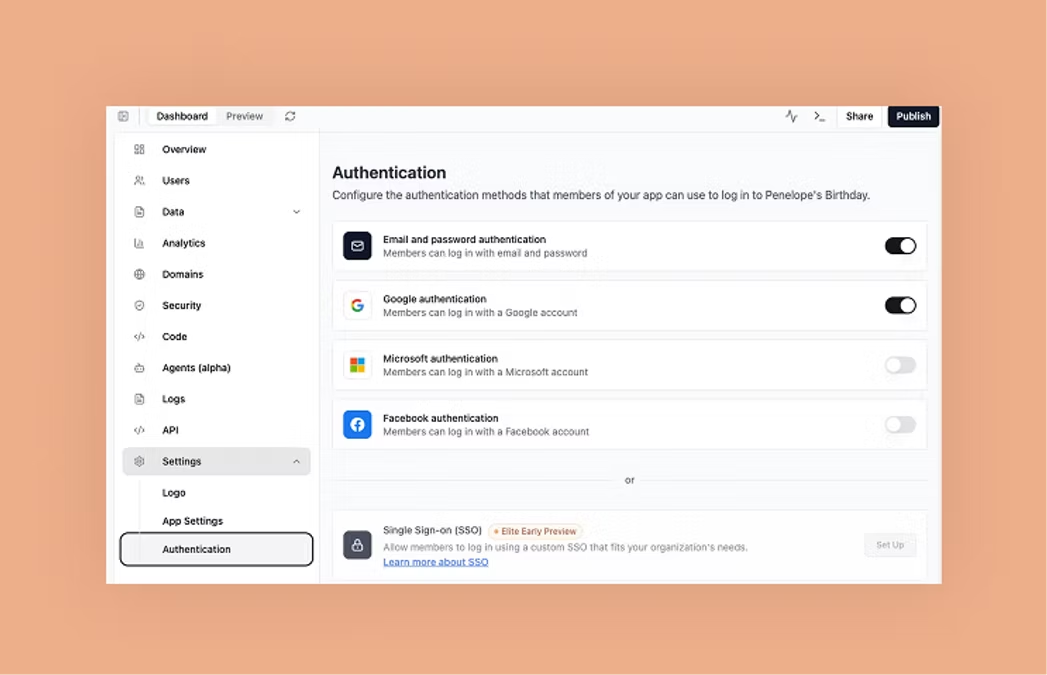
Base44 automatically sets up authentication, including sign-up, login, password resets and role management. You can modify access rules through a visual settings panel. Two-factor authentication and social logins are available as add-ons.
Bolt does not include a proprietary, standalone authentication engine out of the box. Instead, you use integrations (such as Supabase) and configure the authentication flows yourself, connecting your auth project, wiring login/signup logic, and handling credentials and state. While Bolt’s tooling and prompts may help scaffold starter code for authentication, they don’t completely abstract away the setup and customization steps you’ll need to do.
06. Database management
Watch: Base44 Data handling tutorial
Base44 comes with a built-in data layer organized around tables and fields, allowing you to manage structured information such as users, orders, posts, or other content types. Each table includes configurable app security settings, so you can define who has permission to view or modify records, whether that’s the record creator or users matching specific properties. Data can be added, imported, removed, or updated in bulk directly within the platform. For connecting beyond Base44, you can generate API code snippets to read and write data from other apps.
Bolt supports connecting to databases but you’ll have to choose your database (e.g., Postgres, Mongo, etc.) and wire up connections with environment variables and code.
07. UI/UX quality

Base44 gives you intuitive design tools so you can shape the look and feel of your app without diving deep into code. You can pick styling templates, adjust colors, fonts, layouts, and apply changes globally or just locally. The platform also supports responsive design: your app auto-adjusts for mobile, and you can preview or tweak styles specifically for smaller screens.
For more control, you can make element-level edits (e.g. change spacing, gradients, backgrounds) and even integrate custom styles like Tailwind CSS. In addition, Base44 supports versioning for design changes, so you can track and revert UI adjustments over time.
Bolt provides a visual / hybrid interface in which you can build and edit your app through both design and code. You work in a dual environment: you can tweak the design (e.g. layout, style) via prompts or visual cues, and you can also dive into the underlying code (React + Tailwind, for example) for deeper customization.
08. Integrations

Base44 provides built-in integrations for payments, email notifications, analytics and more. These can be added via the visual editor or through simple configuration. For instance, you can ask the chat to add in a Stripe integration payment block and the platform will automatically generate checkout flows and record transactions in your database. Enabling an email integration sets up SMTP providers, templating and event triggers with minimal configuration.
Bolt does not provide its own built-in authentication or payment modules; instead, it relies on integrations (for example, with Supabase for auth or Stripe for payments) that you add to your project. To use these services, you supply API keys, configure settings, and wire up connection logic yourself. While Bolt’s AI and scaffolding may help generate starter code or templates for these integrations, you typically remain responsible for error handling, state management, and customizing the logic to your use case.
09. Pricing
Base44’s pricing, shown as annual rates. Monthly plans are also available:
- Free: Access all of Base44’s core features at no cost and see what it can do.
- Starter ($16/month): Build out your first apps for personal projects or early-stage ideas.
- Builder ($40/month): Take your idea to the next level with tools to meet your professional needs.
- Pro ($80/month): Access advanced tools and support for developing complex applications.
- Elite ($160/mo): Scale your app effortlessly with top credits and dedicated support.
Bolt’s pricing, shown as annual rates. Monthly plans are also available:
- Free: Start building apps at no cost with Bolt’s free plan.
- Pro ($18/mo): Unlock premium features for individual builders.
- Teams ($27/mo): Collaborate with teammates and manage projects together.
- Enterprise (custom pricing): Get advanced security, compliance and 24/7 support tailored to your organization.
For more details, check out Base44’s billing and plans to see what works for you.
Differences between Base44 and Bolt

Base44 focuses on empowering non-technical users to turn ideas into finished products without writing code. It handles every layer, UI, logic, database and hosting and provides simple tools for customization.
Bolt better serves developers who want full control but with AI support to accelerate their workflow. It provides a browser-based IDE powered by WebContainers, where you can prompt the AI to scaffold features, generate code, or fix errors, while still editing and managing the project’s file structure directly.
| Base44 | Bolt | |
|---|---|---|
| Focus | No-code creation for non-technical users | AI-assisted coding for developers |
| What it handles | UI, logic, database, hosting, all managed automatically | Full codebase in a browser IDE; you edit and control everything |
| Customization | Simple visual tools and optional export for advanced editing | Direct file structure editing with AI help |
| Best for | Creators who want a live app fast, without setup or coding | Developers who want speed but still need full control |
| Workflow style | Prompt → app, no dev handoff needed | Code + AI scaffolding integrated into existing workflow |
The information in this article is accurate as of September 28, 2025. It is provided for general informational purposes only and may change without notice.
Which one should you choose?
Choose Base44 if you want a working app without touching code, need the backend, database and hosting handled for you, or you're a non-technical founder who wants to move fast. Choose Bolt if you're comfortable working in code, want full control over your file structure and Git workflow, or you're building something that needs deep custom logic beyond what visual tools can handle. Both can get you from idea to a working app quickly, the real question is how hands-on you want to be with the code underneath.
Base44 vs Bolt FAQ
What's the main difference between Base44 and Bolt?
Base44 generates a fully working app including backend, database and hosting, directly from natural language prompts.
Bolt is a browser-based IDE powered by WebContainers. It uses AI to scaffold features, generate code and handle integrations, while still giving developers full access to and control over the codebase.
Which platform is better for non-technical users?
Base44 is designed for non-technical users who want to launch apps without coding.
Bolt is more developer-oriented: while AI can generate scaffolding and reduce boilerplate, building production-ready applications still requires programming knowledge to handle logic, state and error management.
How long does it take to build an app with each platform?
Base44 can produce a working, deployable app in minutes with no setup.
Bolt accelerates development significantly by handling environment setup, integrations (Supabase, Stripe, GitHub, etc.) and scaffolding code, but you’ll still spend time coding, testing and refining your project.
What types of applications work best with each platform?
Base44 is ideal for business tools, SaaS products and workflows where end-to-end functionality is needed immediately.
Bolt suits projects where developers want AI to speed up coding and integrations, ranging from prototypes and internal tools to complex production apps, while maintaining hands-on control of the code.
How secure are applications built on these platforms?
Base44 includes managed hosting, security best practices and automatic backend hardening.
Bolt projects, however, inherit the security model of the libraries, frameworks and hosting providers you choose. Bolt gives you flexibility, but securing and maintaining the app is ultimately up to the developer.
Who owns the data and applications I create?
With Base44, you own your application and can export the code once you're on a Builder plan or higher.
With Bolt, you own the full codebase you generate or write, along with your data. Hosting and storage are configured through external providers (e.g., Supabase, Netlify), so ownership and management of those resources depend on your chosen integrations.
Can I publish a Base44 app to the App Store or Google Play?
Yes. Base44 can scan your app against store guidelines and generate the App Store and Google Play submission files directly, no third-party wrapper needed, on a Builder plan or higher. Bolt doesn't offer this natively; you'd need a separate tool to wrap a Bolt-built web app for app store submission.